

Paper Trails Overhaul
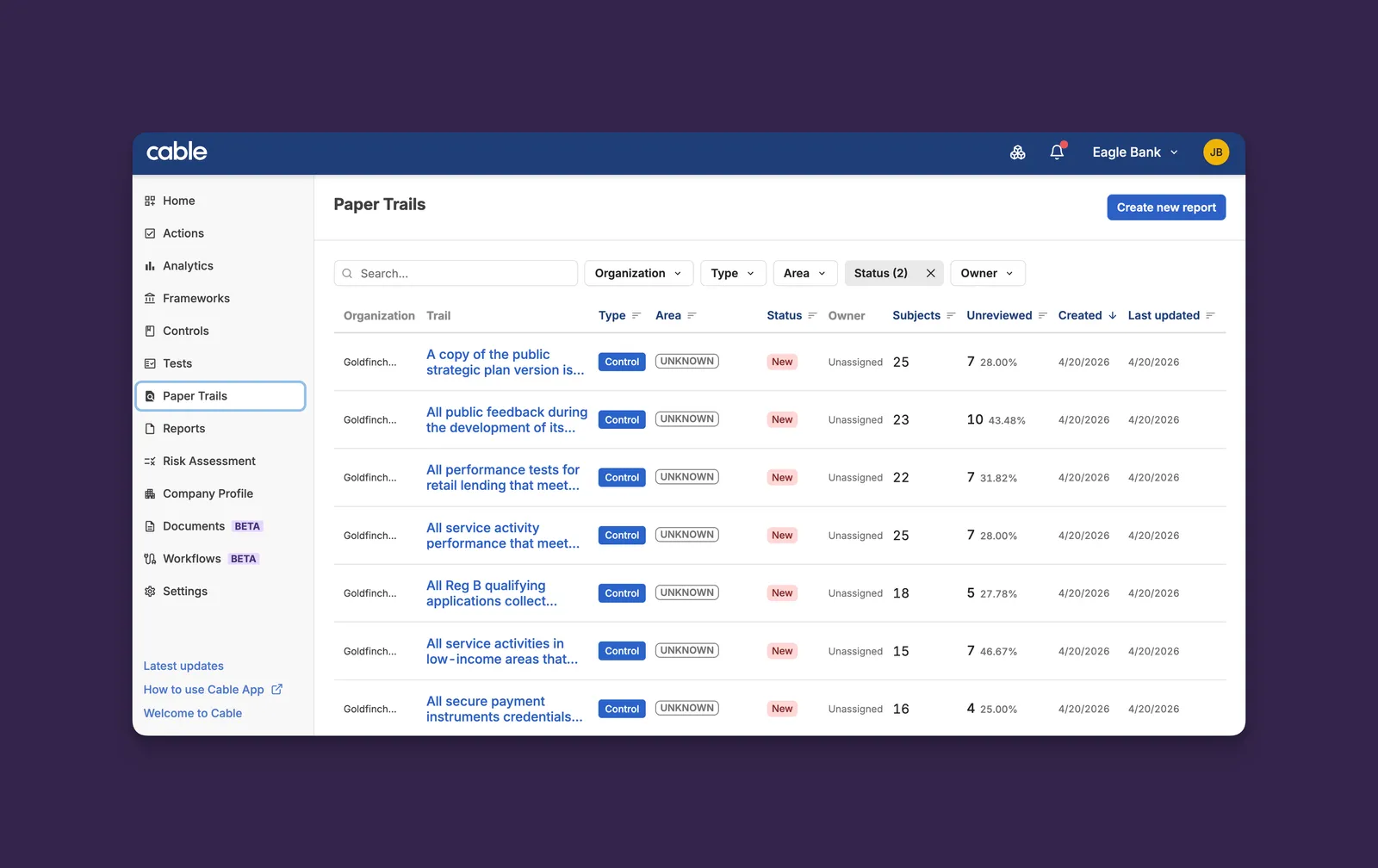
Paper Trails has been rebuilt with a faster list, better visibility from the homepage, and correct workspace scoping across parent and child organizations.
Key Features:
-
Faster List: Filtering, sorting, and pagination stay fast and consistent even on the largest organizations with thousands of trails
-
Search: A new search bar on the list lets you find a specific trail by keyword instead of scanning or filtering down to it
-
Homepage Widgets: Paper Trails metrics now surface on your homepage so the most urgent work is visible the moment you log in
-
Workspace Scoping: The list respects your selected workspace consistently, so parent-org users no longer see child-org trails bleed into their default view
These improvements deliver a faster day-to-day experience for compliance teams managing large trail volumes and eliminate cross-workspace visibility confusion.
Analytics Out of Beta
Analytics has graduated from beta to a core part of Cable. The feature is now available to every organization by default (no feature flag required), and the legacy Dashboard has been retired in favor of a single Analytics home.
Key Features:
- Always-On Access: The BETA label has been removed. Analytics is now part of the standard experience for all organizations
- Dashboard Retired: The legacy Dashboard page has been removed. All of its functionality lives in Analytics, and existing bookmarks redirect there automatically
- Cleaner Navigation: The sidebar no longer shows a separate Dashboard entry, leaving one clear entry point to all compliance metrics
Analytics now provides one unified place for executive, subject, and QA insights, removing ambiguity about where to find compliance data and simplifying the sidebar for every team.
Risk Assessment Wizard Refresh
The Risk Assessment wizard has been overhauled with a cleaner navigation pattern, scores that update as you edit, and a noticeably faster page load. URLs have been simplified at the same time, and the deprecated Custom Risk Builder has been retired.
Key Features:
- Tabbed Stage Navigation: The breadcrumb-style stepper has been replaced with a tab strip that mirrors the rest of Cable. Each tab shows at-a-glance progress for that stage, and Download PDF now lives next to the status badges in the header
- Live Header Scores: Inherent and residual risk scores in the header now update the moment you change an answer or risk, instead of staying stale until a reload
- Faster Page Load: A round of behind-the-scenes optimizations cut the wizard’s initial load time roughly in half on populated assessments
- Read-Only Polish: Multi-select, dropdown, and numeric-with-units questions now render their values correctly in read-only mode (previously some appeared blank or partial)
- Simpler URLs:
/risk-assessment/fincrime/...has been flattened to/risk-assessment/..., with permanent redirects so old links continue to work - Custom Risk Builder Retired: The standalone Custom Risk Builder surface has been removed. All risk-area editing now happens within the assessment itself
A faster, more polished wizard, with progress and scores that stay in sync with the work you’re actually doing.
Document-Driven Workflow Creation
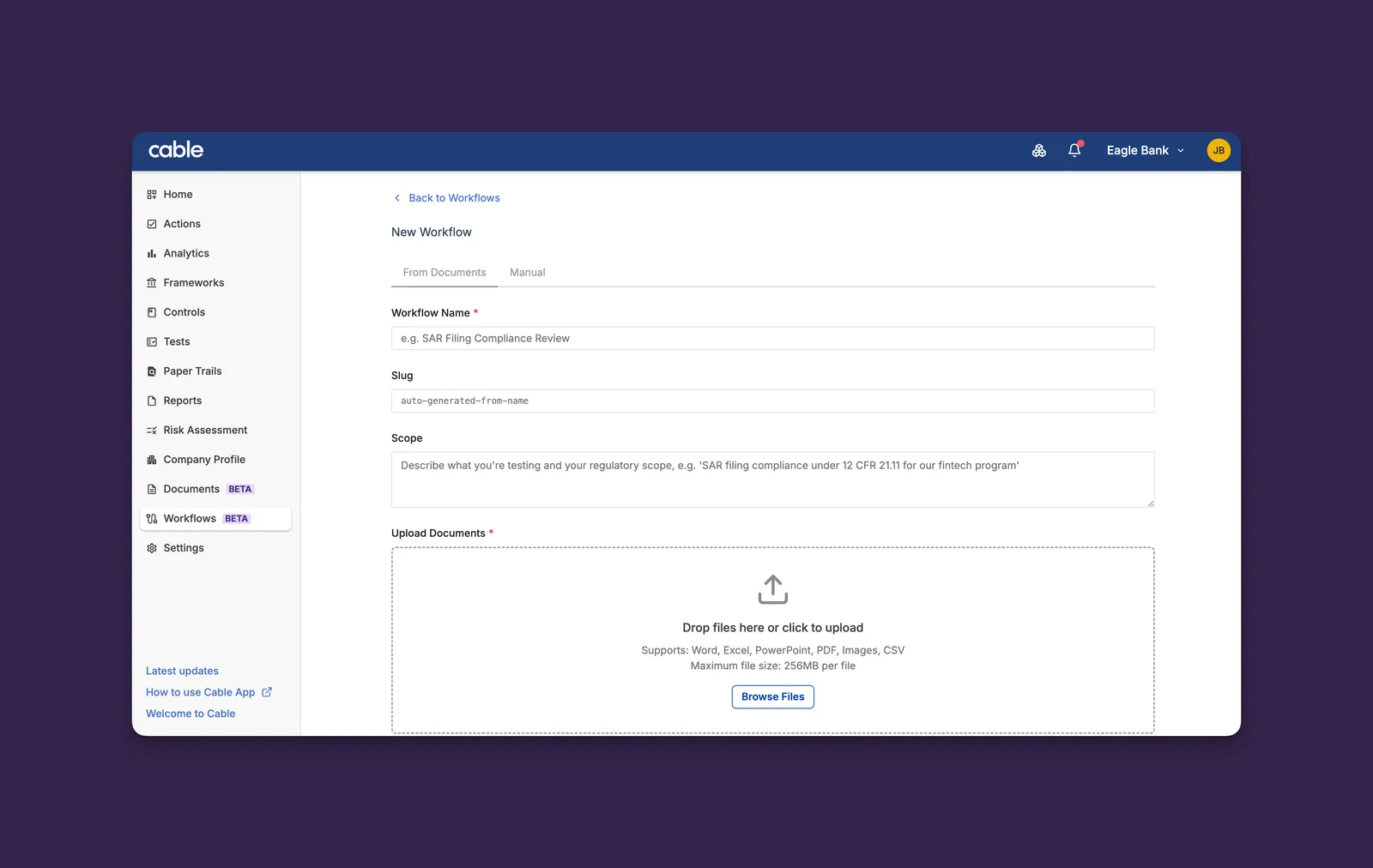
Workflows can now be drafted from your own compliance documents. Upload policies, procedures, or regulations, describe the scope, and Cable proposes a complete workflow (tests, data attribute mappings, and source citations) for you to review and approve before anything is saved.
Key Features:
-
From Documents Tab: A new path on workflow creation accepts one or more documents alongside a scope description
-
Reviewable Drafts: Each proposed test shows the source document citation and the data fields it requires, inline. Edit names, edit descriptions, add tests, or remove them before approving
-
Cited Sources: Every test keeps a reference back to the document it came from, so reviewers can trace each control to its origin
-
Manual Path Unchanged: The existing Manual creation tab is untouched for teams that prefer to build workflows by hand
Document-driven creation turns the slowest part of standing up a new workflow (translating a policy into tests) into a review step, while keeping you as the authority on what actually gets saved.
Subject External Link Templates
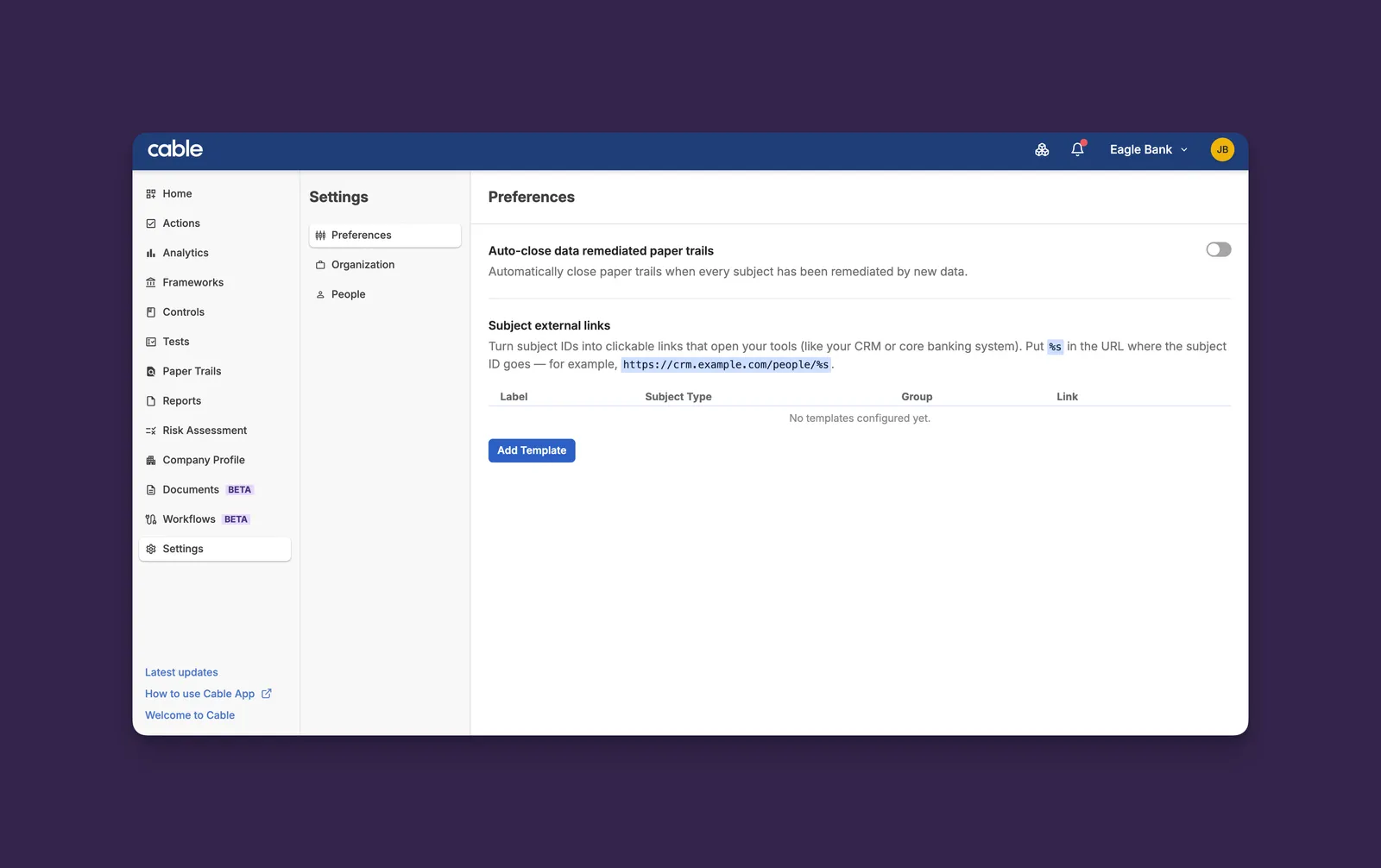
Admins can now configure URL templates that turn subject IDs across Cable into clickable links to your internal systems, like case management tools, KYC platforms, or anywhere else your team needs to jump to.
Key Features:
-
Template Management: Create, edit, and delete link templates from Settings → Preferences, with a label, subject type, optional group label, and URL template
-
Per Subject Type: Configure different links for different subject types so each subject only shows the destinations that make sense for it
-
Multiple Links Per Subject: Add as many templates as you need; group labels keep them organized when there are several
This eliminates the copy-paste-into-another-tab step that compliance teams hit dozens of times a day when investigating subjects across systems.
Welcome Modal for New Users
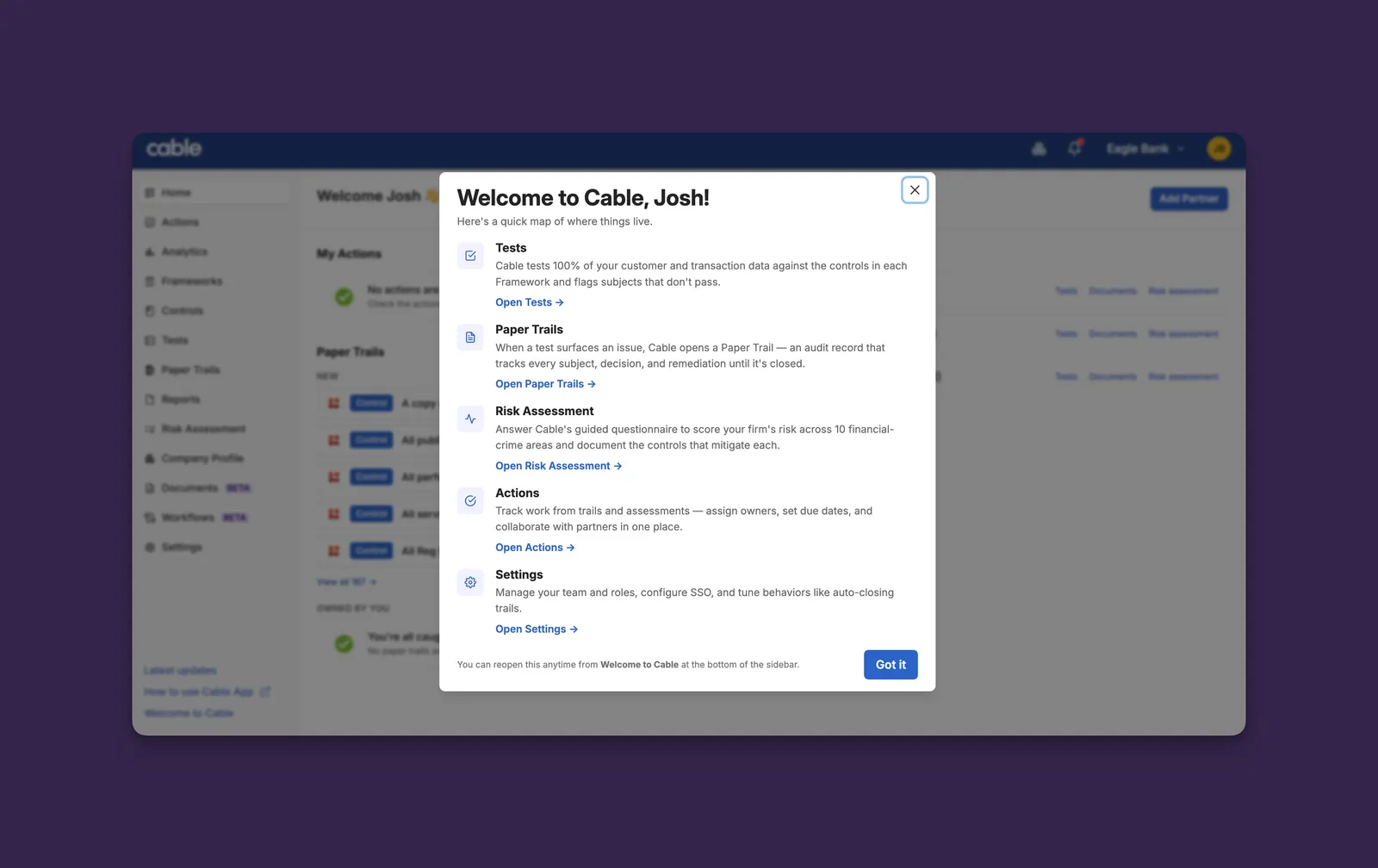
First-time users now get a quick tour of Cable’s main surfaces (Tests, Paper Trails, Risk Assessment, Actions, and Settings) the moment they sign in, with deep links into each section.
Key Features:
-
Personalized First-Run: Greets each new user by first name with product-accurate descriptions of where to go for what
-
Replayable Anytime: A “Welcome to Cable” link in the sidebar footer reopens the modal whenever someone wants a refresher
-
Existing Users Unaffected: The modal only auto-opens for users created after this release, so your current team won’t be interrupted on their next login
Faster, more confident onboarding for new teammates, without forcing them to find the right surface by trial and error.
User Export and Last-Login Tracking
Settings → People now supports exporting your full user list as a CSV, with last-login timestamps recorded per user, built for the access reviews that compliance and security teams run on a recurring cadence.
Key Features:
- CSV Export: One click downloads name, email, role, status, date added, date suspended, and last login for every user in the org, including suspended accounts
- Last-Login Timestamps: Login times are now captured across every sign-in method (SSO, password, and first-time registration) so the export carries a meaningful access signal
- Refreshed People Tab: The action buttons have been polished with consistent icons and a clearer separation between primary and secondary actions
Whether you’re pruning dormant accounts or producing evidence for an auditor, the data you need is now one click away.
Self-Serve User Deactivation
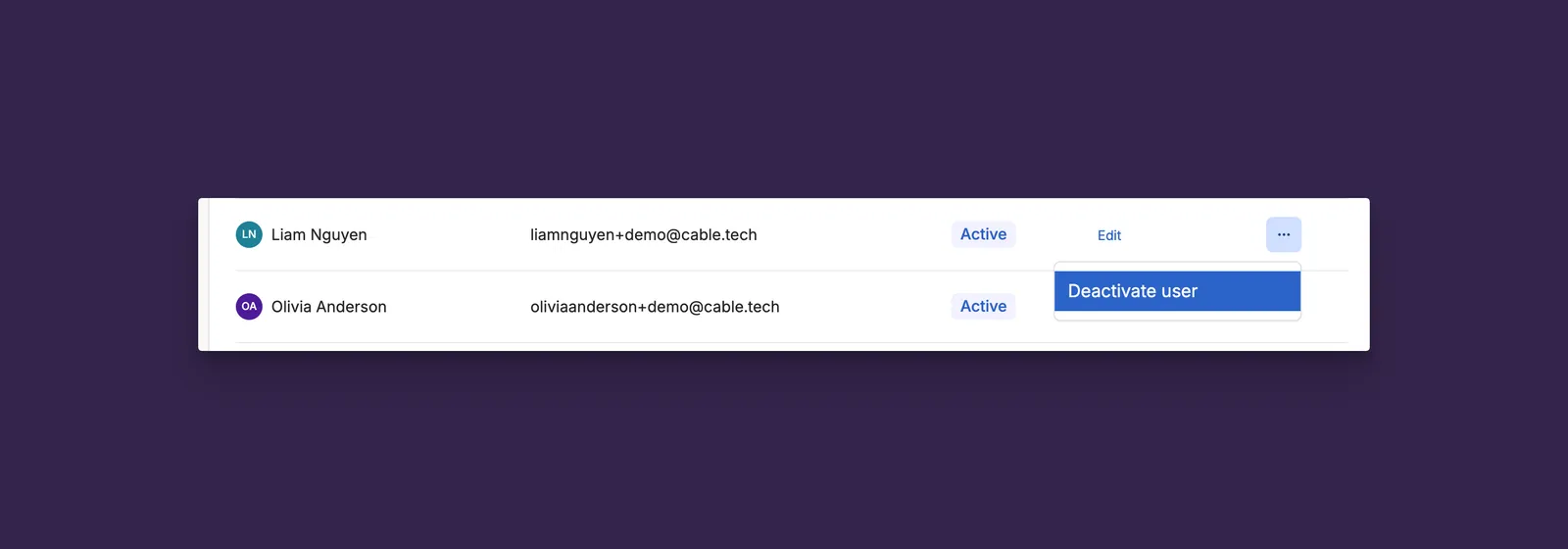
Org admins can now deactivate users directly from Settings → People, replacing the support-ticket flow that engineering had been running by hand. Deactivations are scoped per-org, fully audited, and reversible.
Key Features:
-
Row-Level Actions: Each user has a menu with the right action for their state. Deactivate for active users, Resend Invite or Deactivate for invited users, Reactivate for deactivated users. A confirmation dialog spells out what’s preserved and what’s removed
-
Per-Org Scope: Removes the user from this organization only. Memberships in other orgs stay intact, so parent-org admins can offboard from their own org without affecting child-org teams
-
Last-Admin Protection: Cable refuses to deactivate the final remaining admin of an organization, preventing accidental lockouts
-
Reactivation via Re-Invite: Restoring access reuses the standard invite flow. Past activity, comments, trail events, and investigations all remain attached when the user returns
-
Audit-Ready Export: The user CSV now captures the deactivation date and who performed the deactivation alongside the existing fields, built for the recurring access reviews that compliance and security teams run
-
Show Inactive Users Toggle: A new switch on the People tab reveals deactivated and suspended members for review and reactivation
Departures, contractor turnover, and quarterly access reviews are now fully self-service for org admins, with a complete audit trail attached to every change.
Resend Invite
Org admins can now resend an invite directly from Settings → People for any user still in the Invited state. No more reaching out to support to recover a stale invite link.
Key Features:
- Self-Serve Action: A Resend Invite link appears next to any invited user; clicking it generates a fresh invite code and re-sends the email
- Safe on Failure: If the email fails to send, the original invite code is preserved so the original link keeps working
- Permission-Gated: Only available to admins with user-invite permission on the organization
A small but frequently-asked-for fix that closes the gap between “invited a teammate” and “they’re actually in the app.”